Sunday, February 28, 2016

hibernate.cfg.xml

Basic setup

<?xml version="1.0" encoding="UTF-8"?>
<!DOCTYPE hibernate-configuration PUBLIC
  "-//Hibernate/Hibernate Configuration DTD 3.0//EN"
  "http://hibernate.sourceforge.net/hibernate-configuration-3.0.dtd">
<hibernate-configuration>
    <session-factory>
     <property name="hibernate.dialect">org.hibernate.dialect.MySQLDialect</property>
     <property name="connection.driver_class">com.mysql.jdbc.Driver</property>
     <property name="connection.username">root</property>
     <property name="connection.password">root</property>
     <property name="connection.url">jdbc:mysql://192.168.56.101:3306/hibernate</property>
     <mapping resource="com/gvace/domain/Employee.hbm.xml"/>
    </session-factory>
</hibernate-configuration>

<mapping resource="com/gvace/domain/Employee.hbm.xml"/> for mapping to each *.hbm.xml file


Output query for debug: 
 <property name="show_sql">true</property>
<property name="format_sql">true</property>

  <property name="hbm2ddl.auto">

<property name="hbm2ddl.auto">update</property>
Variable values: validate | update | create | create-drop
So the list of possible options are,
  • validate: validate the schema, makes no changes to the database.
  • update: update the schema, alter or add column, never delete column
  • create: creates the schema, destroying previous data, every time when app loads
  • create-drop: drop the schema when session factory closed.


Session Range
<property name="hibernate.current_session_context_class"> thread</property>
hibernate.current_session_context_class: jta, thread, managed, custom.Class
jta: cross databases/hosts, remote server database
thread: local events only, for one single database


Character Encoding
  <property name="hibernate.connection.CharSet">utf8</property>
  <property name="hibernate.connection.characterEncoding">utf8</property>

  <property name="hibernate.connection.useUnicode">true</property>

Saturday, February 27, 2016

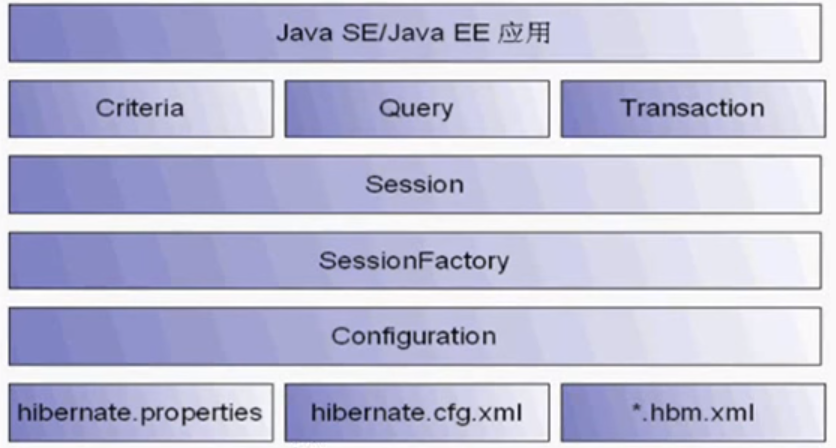
Hibernate

Core Classes and Interfaces


Hibernate API

ORM(Object Relation Mapping)


pojo: plain ordinary java object

A pojo object
  1. Has at least a primary key field
  2. other fields
  3. public get/set functions
  4. a non-parameter construct function(for hibernate reflection use)

Configuration :
Load hibernate.cfg.xml
Manage ORM files
Load driver, url, login
Manage hibernate configs

SessionFactory :
Get session instance from SessionFactory
Initialized when application starts
Occupied large memory, only need one instance for each database, so use singleton for each database
Cache sql statements and some data (session level cache)


Session : generated from sessionFactory
http://gvace.blogspot.com/2015/12/hibernate-session.html

Transaction : transaction is required, so remember to commit

Example 

Employee pojo -> employee table

hibernate.cfg.xml

<?xml version="1.0" encoding="UTF-8"?>
<!DOCTYPE hibernate-configuration PUBLIC
  "-//Hibernate/Hibernate Configuration DTD 3.0//EN"
  "http://hibernate.sourceforge.net/hibernate-configuration-3.0.dtd">
<hibernate-configuration>
    <session-factory>
     <property name="hibernate.dialect">org.hibernate.dialect.MySQLDialect</property>
     <property name="connection.driver_class">com.mysql.jdbc.Driver</property>
     <property name="connection.username">root</property>
     <property name="connection.password">root</property>
     <property name="connection.url">jdbc:mysql://192.168.56.101:3306/hibernate</property>
     <property name="show_sql">true</property>
     <mapping resource="com/gvace/domain/Employee.hbm.xml"/>
    </session-factory>
</hibernate-configuration>


Employee.hmb.xml

hmb.xml file: manage relationship between a pojo class and a table

<?xml version="1.0"?>
<!DOCTYPE hibernate-mapping PUBLIC "-//Hibernate/Hibernate Mapping DTD 3.0//EN"
"http://hibernate.sourceforge.net/hibernate-mapping-3.0.dtd">
<!-- Generated Feb 26, 2016 10:59:22 PM by Hibernate Tools 3.4.0.CR1 -->
<hibernate-mapping>
    <class name="com.gvace.domain.Employee" table="employee">
        <id name="id" type="java.lang.Integer">
            <column name="ID" />
            <generator class="increment" />
        </id>
        <property name="name" type="java.lang.String">
            <column name="NAME" not-null="true"/>
        </property>
        <property name="email" type="java.lang.String">
            <column name="EMAIL" not-null="true" />
        </property>
        <property name="hiredate" type="java.util.Date" >
            <column name="HIREDATE" not-null="true"/>
        </property>
    </class>
</hibernate-mapping>


Employee.java

pojo class, require serialize

package com.gvace.domain;

public class Employee implements Serializable{
 private static final long serialVersionUID = -3742562662542696434L;
 private Integer id;
 private String name;
 private String email;
 private java.util.Date hiredate;
 public Integer getId() {
  return id;
 }
 public void setId(Integer id) {
  this.id = id;
 }
 public String getName() {
  return name;
 }
 public void setName(String name) {
  this.name = name;
 }
 public String getEmail() {
  return email;
 }
 public void setEmail(String email) {
  this.email = email;
 }
 public java.util.Date getHiredate() {
  return hiredate;
 }
 public void setHiredate(java.util.Date hiredate) {
  this.hiredate = hiredate;
 }
 public Employee() {
 }
}


Example of using the pojo

 @Test
 public void test(){
  //1. Initiate config, load config file
  Configuration configuration = new Configuration().configure("hibernate.cfg.xml");
  //2. Create SessionFactory, normally use singleton
  ServiceRegistry serviceRegistry;
  serviceRegistry = new StandardServiceRegistryBuilder().applySettings(configuration.getProperties()).build();
  SessionFactory sessionFactory = configuration.buildSessionFactory(serviceRegistry);
  //3. Create session
  Session session = sessionFactory.openSession();
  //4. Start a transaction
  Transaction transaction = session.beginTransaction();
  
  //5. Add an employee
  Employee employee = new Employee();
  
  employee.setName("abc");
  employee.setEmail("abc@abc.com");
  employee.setHiredate(new Date());
  
  //6. Save
  session.save(employee);
  
  //7. Commit
  transaction.commit();
  
  //8. Close session
  session.close();
 }


Saturday, February 20, 2016

Struts Tags

In java ee standards, there are three types of tags
  1. customized tags
  2. jstl tags
  3. struts tags
*.tld files: tag lib description
for example struts-html.tld, in struts-taglib.jar, defines all html tags

HTML Tags
<%@ taglib prefix="html" uri="http://struts.apache.org/tags-html" %>

<html:image> is a image button
<html:img> is just a image

paramName ="<name-of-the-form-bean-whose-property-you-want-to-use>" 
paramId ="<name-of-the-parameter>" .... in your case it will be paramId="action"
paramProperty="<value-of-the-parameter-which-is-actually-the-value-of-the-property-of-the-form-bean-uhave-specified-above>"


<logic:notpresent> vs <logic;empty>

usually notpresent is used for availability of roles so you can tailor your jsp pages based on roles. But it basically checks for the existance of objects. 

empty is for checking if strings (length of 0) or collections (null) are empty.


<html:form> must map to a ActionForm class!
And each property inside the form must map to a variable in the ActionForm
<html:form action="/login1.do">: action url must NOT include the webapp directory, and this action will automatically validate by struts BEFORE submit the form! If the action url is not reachable, this page will throw error


Bean Tags
For create, visit bean and bean properties.
Can create bean based on cookies, headers, and parameters
<bean:write> <!-- for output info -->
<%
request.setAttribute("abc","hello world");
%>
<bean:write name="abc"/>

<!-- for output value from object, the property other than String must have format configured
Otherwise, it will cause error "Cannot find message resources under key org.apache.struts.action.MESSAGE"
and Error "org.apache.jasper.servlet.JspServletWrapper.handleJspException"
-->
<%
Cat myCat = new Cat();
myCat.setName("ccc");
myCat.setAge(3);
request.setAttribute("myCat", myCat);
%>

<bean:write name="myCat" property="name"/>
<bean:write name="myCat" property="age" format="0"/>

<bean:message>
Normally used for error message
To use <bean:message>, we need to set struts-config.xml with message-resources

  1. <message-resources parameter="com.gvace.web.struts.ApplicationResources"></message-resources>
  2. create file: com.gvace.web.struts/ApplicationResources.properties
  3. ApplicationResources.properties file content example: key1 = welcome {0}
  4. use the message: <bean:message key="key1" arg0="Yushan"/>
  5. error message example:
    err1 = your error is: {0}{1}
    <bean:message key="err1" arg0="Username is empty" arg1="Password is empty"/>
  6. For character encoding in properties file:
    use native2ascii from jdk/bin/, copy the String into native2ascii, it will translate to ascii
<bean:define> (not often used)

<!-- define a bean or its property -->

<bean:define id="kkk" name="abc" value="hello" scope="request"></bean:define>

<!-- jsp way to define a bean or its property -->
<jsp:useBean id="cat2" class="com.gvace.model.Cat"></jsp:useBean>
<jsp:setProperty name="cat2" property="name" value="tom"/>
<jsp:setProperty name="cat2" property="age" value="3"/>
${cat.name} ${cat.age}
<!-- the above tag equals the following code -->
<%
Cat cat2 = new Cat();
cat2.setName("tom");
cat2.setAge(3);
%>
<bean:page>
not introduced

Logic Tags

<logic:iterate>: iterate through collection/array
<%
List<Cat> al = new ArrayList<Cat>();
al.add(cat1);
al.add(cat2);
al.add(cat3);
al.add(cat4);
pageContext.setAttribute("cats", al);
%>

<logic:iterate id="myCat" name="cats">
${myCat.name}, ${myCat.age}<br />
</logic:iterate>

<logic:empty> <logic:notEmpty>
<logic:empty name="cat1">cat1 not exist</logic:empty>
<logic:notEmpty name="cat1">cat1 is exist</logic:notEmpty>

<logic:greaterThan>
<logic:greaterThan name="myCat" value="3" property="age">
cat: <bean:write name="myCat" property="name"/> age bigger than 20
</logic:greaterThan>


Nested Tags(optional)


Tiles Tags(optional)


Wednesday, February 17, 2016

JSTL

jstl(jsp standard tag library)

Version:
Not lower than JSP1.2 and Servlet 2.3 can use jstl
JSP2.0 can use jstl1.2
  1. normal usage tag
  2. conditional tag
  3. iterator tag
  4. url related tag(xml, sql)
Config jstl library
We need two librarys: jstl and taglibs-standard


import

<%@ taglib prefix="c" uri="http://java.sun.com/jstl/core" %>

Four levels, 


  1. pageContext.setAttribute("abc", "abc1
  2. <c:if test="${empty abc}">
  3. abc is empty
  4. </c:if>
  5. <c:if test="${!empty abc}">
  6. abc is not empty
  7. </c:if>
  8. ");
  9. request.setAttribute("abc", "abc2");
  10. session.setAttribute("abc", "abc3");
  11. application.setAttribute("abc", "abc3");

${pageContext.request.contextPath} is the contextPath I prefer to use, it returns the web app path, as same as request.getContextPath()

empty
detect if value is null, "", empty array, empty map or empty collection
<c:if test="${empty abc}">
abc is empty
</c:if>
<c:if test="${!empty abc}">
abc is not empty

</c:if>

quick condition
${2>1?"bigger":"smaller"}

func(arg,arg1,arg2)
call a function with zero to multiple arguments

<c:out>
<c:out value="${abc}"></c:out>

${} is the mark for that enclosed value is a variable or expression
With the same attribute name, c:out value always looking for the lowest level value first.

<c:out value="${abc}" default="default_value"></c:out> : default value if no attribute found in any level

<c:out value="${abc}"  escapeXml="false"></c:out>
true: make the output to be text only
false: make the output to be html
default is true


<c:out value="${user.name}"></c:out>: user is an object, name is the field of the object
Which equals ((User)request.getAttribute("user")).getName();

<c:set>
<c:set var="abc" value="abc4" scope="request"></c:set>
Do not include ${} in var because it's already variable name, only use ${} when it's for value

<c:remove>
<c:remove var="abc" scope="request"/>
If scope is not set, this will remove all four levels attributes with that variable name

<c:catch>
<c:catch var="myException" >
<% int i=8/0; %>
</c:catch>
<c:out value="${myException}"></c:out><c:out value="${myException.message}"></c:out>
Catch and assign the exception a variable name, so you can catch it latter

<c:if>
<c:if> can only work with single condition
<c:if test="${a=='hello'}">
OK!
</c:if>
<c:if test="${a!='hello'}">
NOT OK!
</c:if>

<c:if test="${age>56}">
older
</c:if>

<c:if test="${age1>10 and age1<56}">
in middle
</c:if>

<br />

<c:choose><c:when><c:otherwise>
Same as:
switch(){
case:
case:
default:
}
<c:choose>
<c:when test="${age>56}">Old</c:when>
<c:when test="${age<29}">Young</c:when>
<c:when test="${age>=29 and age<=56}">Middle</c:when>
<c:otherwise>Age not available</c:otherwise>
</c:choose>


<c:forEach>

<%
ArrayList<User> list = new ArrayList<User>();
list.add(new User("aaa",19));
list.add(new User("bbb",29));
list.add(new User("ccc",39));
pageContext.setAttribute("list", list);
%>
1.Simple forEach
<c:forEach items="${list}" var="user">
<c:out value="${user.name}" />
<c:out value="${user.age}" />
<br />
</c:forEach>
2. iterate fix times, like for loop
<c:forEach var="i" begin="1" end="10">
<c:out value="${i}" />
</c:forEach>
3. iterate fix times with number of steps, like for loop
instance 1 can use `step` also
<c:forEach var="i" begin="1" end="10" step="3">
<c:out value="${i}" />
</c:forEach>
4. can iterator through map or set
<c:forEach items="${map}" var="entry">
key=${entry.key},value=${entry.value}
</c:forEach>

<c:forEach items="${set}" var="value">
value=${value}
</c:forEach>
5. nested level also work fine
<c:forEach items="${set}" var="value">
name=${value.person.name}
departmentName=${value.department.name}
</c:forEach>

<c:forTokens>
<c:forTokens items="a,b,c,d,e,f" begin="0" end="2" step="2" delims="," var="value">
<c:out value="${value}" />
</c:forTokens>

<c:redirect>
<c:redirect url="http://www.google.com"></c:redirect>

<c:import>
import other pages, can also pass parameters, use ${param.name} to get passed value
<c:import url="/WEB-INF/a.jsp">
<c:param name="name" value="abc"></c:param>
</c:import>

Monday, February 15, 2016

Struts1 Config more

Load Struts1, config web.xml

  <servlet>
    <servlet-name>action</servlet-name>
    <servlet-class>org.apache.struts.action.ActionServlet</servlet-class>
    <init-param>
      <param-name>config</param-name>
      <param-value>/WEB-INF/struts-config.xml</param-value>
    </init-param>
    <load-on-startup>2</load-on-startup>
  </servlet>
  <servlet-mapping>
    <servlet-name>action</servlet-name>
    <url-pattern>*.do</url-pattern>
  </servlet-mapping>

actionServlet can assign multiple config files, separate by comma:
    <init-param>
      <param-name>config</param-name>
      <param-value>/WEB-INF/struts-config.xml,/WEB-INF/struts-config1.xml,</param-value>
    </init-param>

In Struts1, Each Action is a Servlet, and each Servlet is singleton

Action scope: Default is session
  • request: request.setAttribute("UserForm",userForm); //auto runs by Struts1
  • session: request.getSession().setAttribute("UserForm",userForm); //auto runs by Struts1


<action-mappings>
 <!-- localhost:8080/webapp/login.do, action path is the requested url path -->
 <!-- form-bean connect to the action identified by name -->
 <action path="/login" name="UserForm" scope="request" type="com.gvace.struts1login.actions.LoginAction">
  <!-- action choose which forward to go by forward name -->
  <forward name="ok" path="/WEB-INF/welcome.jsp"></forward>
  <forward name="err" path="/WEB-INF/err.jsp"></forward>
 </action>
</action-mappings>


Sunday, February 14, 2016

Character encoding problem on Struts

ActionServlet automatically fills the actionForm, there is no way to set character encoding after this.

We have to do character encoding before calling ActionServlet.
So we have to use <filter> before ActionServlet.

@WebFilter(filterName="/CharacterEncodingFilter", urlPatterns="/*")
public class CharacterEncodingFilter implements Filter {

    /**
     * Default constructor. 
     */
    public CharacterEncodingFilter() {
        // TODO Auto-generated constructor stub
    }

 /**
  * @see Filter#destroy()
  */
 public void destroy() {
  // TODO Auto-generated method stub
 }

 /**
  * @see Filter#doFilter(ServletRequest, ServletResponse, FilterChain)
  */
 public void doFilter(ServletRequest request, ServletResponse response, FilterChain chain) throws IOException, ServletException {
  request.setCharacterEncoding("utf-8");
  response.setContentType("text/html;charset=utf-8");
  chain.doFilter(request, response);
 }

 /**
  * @see Filter#init(FilterConfig)
  */
 public void init(FilterConfig fConfig) throws ServletException {
  // TODO Auto-generated method stub
 }

}


Struts1 internal mechanism with an example to use

Seeing the diagram from here


To understand Struts1 internal mechanism, we will do manual setup and config for one web login request.


  1. ActionServlet: core servlet of Struts, is the call center of struts
  2. web.xml: Config web.xml to load ActionServlet as a normal servlet(the entrance of struts framework)
         Assign ActionServlet's own config file in <init-param>: struts-config.xml
         In this config, all *.do url requests will be forward to use structs framework
        The ActionServlet is important to be initialized before the first call, so:
    <load-on-startup>2</load-on-startup> is important to set, when you see error :  Module 'null' not found. 
  3.   <servlet>
       <servlet-name>action</servlet-name>
       <servlet-class>org.apache.struts.action.ActionServlet</servlet-class>
       <!-- struts-config -->
       <init-param>
        <param-name>config</param-name>
        <param-value>/WEB-INF/struts-config.xml</param-value>
       </init-param>
       <load-on-startup>2</load-on-startup>
      </servlet>
      <servlet-mapping>
       <servlet-name>action</servlet-name>
       <url-pattern>*.do</url-pattern>
      </servlet-mapping>
    
  4. struts-config.xml: ActionServlet load this file to config all actions and actionForms
    (a)action's path will be the requested url's resource part(take the string ".do" out)
    (b)<form-bean>'s name will be used to match <action>'s name
    (c)<forward> name will be used to forward to target output file

    <?xml version="1.0" encoding="UTF-8"?>
    <!DOCTYPE struts-config PUBLIC "-//Apache Software Foundation//DTD Struts Configuration 1.3//EN"
           "http://struts.apache.org/dtds/struts-config_1_3.dtd">
    <struts-config>
     <form-beans>
      <form-bean name="UserForm" type="com.gvace.struts1login.forms.UserForm"></form-bean>
     </form-beans>
     <action-mappings>
      <!-- localhost:8080/webapp/login.do, action path is the requested url path -->
      <!-- form-bean connect to the action identified by name -->
      <action path="/login" name="UserForm" type="com.gvace.struts1login.actions.LoginAction">
       <!-- action choose which forward to go by forward name -->
       <forward name="ok" path="/WEB-INF/welcome.jsp"></forward>
       <forward name="err" path="/WEB-INF/err.jsp"></forward>
      </action>
     </action-mappings>
    </struts-config>
    
  5. Form-bean(UserForm.java in the example), extends ActionForm, is a javabean
    Set all field names match to the form attributes
  6. Action class(LoginAction.java in the example),extends Action, contains the logic to process the Form
    Override the ActionForward function to process all logic
     @Override
     public ActionForward execute(ActionMapping mapping, ActionForm form, HttpServletRequest request, HttpServletResponse response)
       throws Exception {
      UserForm userForm = (UserForm)form;
      if(Auth.succeed(form.getUsername(),form.getPassword())){
       return mapping.findForward("ok");
      }
      return mapping.findForward("err");
     }
    
  7. ActionMapping: use ActionMapping to tell ActionServlet which path to forward, by telling it the forward name, using findForward function: mapping.findForward("ok");