Showing posts with label HDFS. Show all posts

Saturday, October 22, 2016

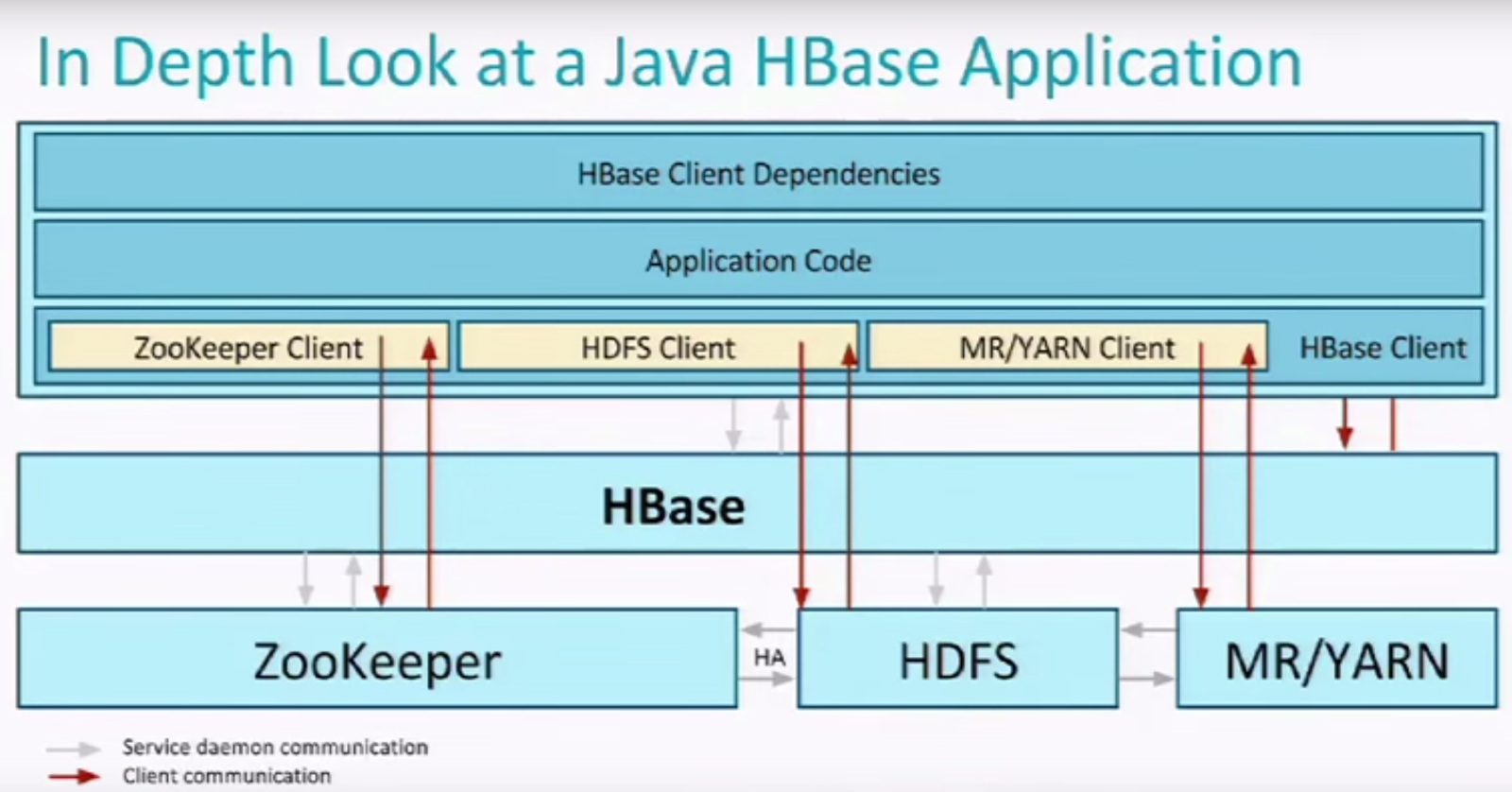
HBase Application


API Available

Java API: Full-featured, does not require server daemon, just need client libraries/configs to be installed

REST API: Easy to use, stateless, but slower than Java API, require REST API server, can directly get data from http request

Thrift API: Multi-language support, light weight, require Thrift API server


Configuration
  • Key-values that define client application properties
DDL
  • HBase Admin
    create/modify/delete tables
  • H*Descriptor
    Describe and manipulate metadata
DML
  • Mutations: Incr/Delete/Put/Check-and-Put/Multiput*
Query
  • Scan/Get/Filter


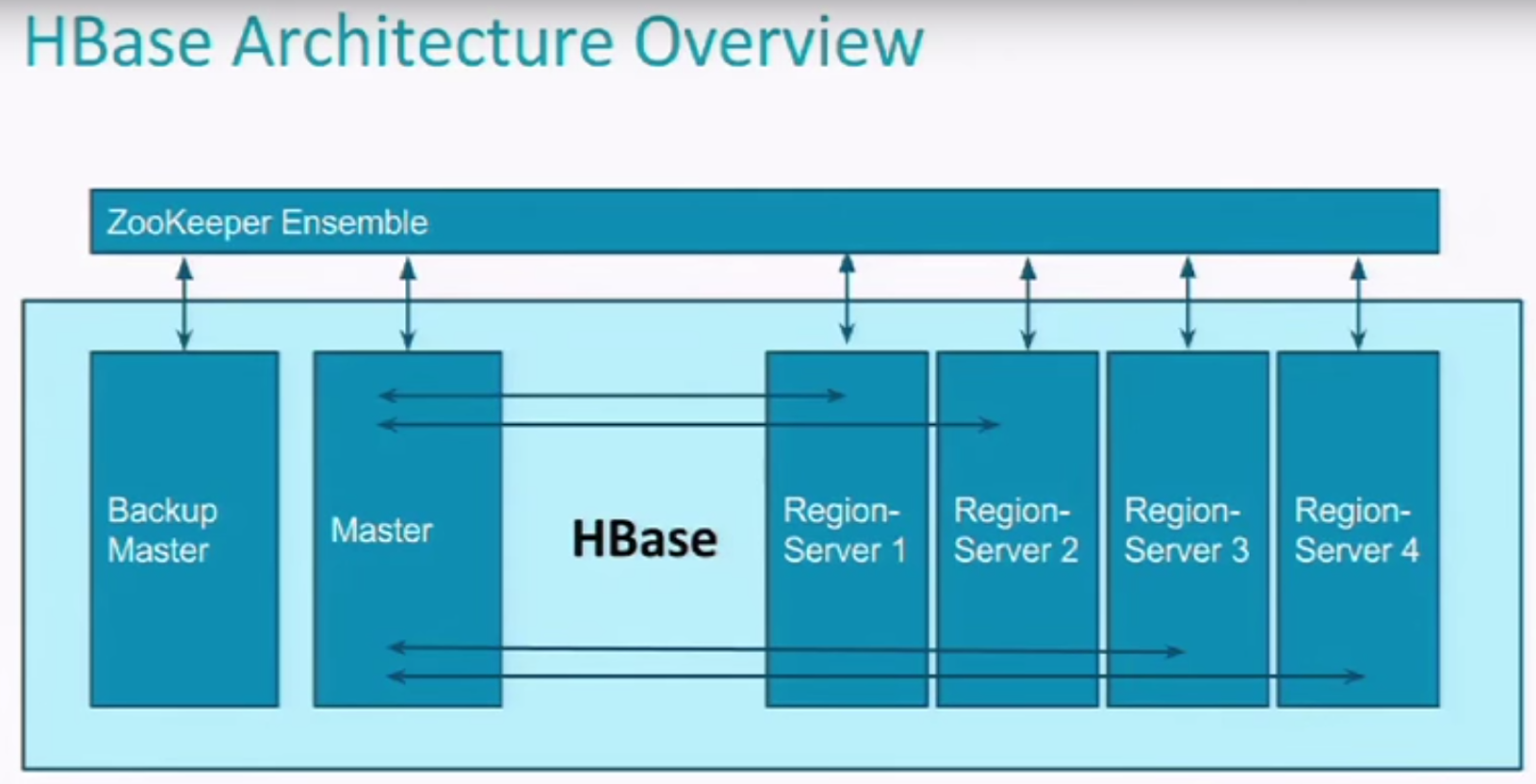
HBase System Architecture, Compare to Others


.META. 's Region Server will be well known by ZooKeeper, 
So Master Node can know where to read it by talking to ZooKeeper.
Once .META. is cached, Master can find any data lives in HBase


HBase VS Other NoSQL

  • Great large Scalibility
  • Strict Consistency
  • Availability not perfect, but can be managed 

  • Integrates with Hadoop
    Very efficient bulk loads and MapReduce analysis
  • Ordered range partitions(not Hash)
  • Automatically shards/scales(just add more servers)
  • Sparse storage(for each row)

Compare to RDBMS

Saturday, May 21, 2016

MapReduce Examples

Running MapReduce in YARN

We have some default example of MapReduce jars from Hadoop


Example: WordCount

Put a text file into hdfs system, I put it as /data01/LICENSE.txt
I want the output result to /data01/LICENSE_WordCount.txt
(I was thinking the output result is just one file, but it has to be a folder), so here LICENSE_WordCount.txt is a folder name

Run MR
bin/yarn jar share/hadoop/mapreduce/hadoop-mapreduce-examples-2.6.4.jar wordcount /data01/LICENSE.txt /data01/LICENSE_WordCount


The result folder contains an empty file named _SUCCESS which marks the job is succeed.
And a result file: part-r-00000


Example: pi

Pick up one of them, what I choose is pi
Run it:
bin/yarn jar share/hadoop/mapreduce/hadoop-mapreduce-examples-2.6.4.jar pi

It requires two arguments: <nMaps> and <nSamples>
Usage: org.apache.hadoop.examples.QuasiMonteCarlo <nMaps> <nSamples>
Generic options supported are
-conf <configuration file>     specify an application configuration file
-D <property=value>            use value for given property
-fs <local|namenode:port>      specify a namenode
-jt <local|resourcemanager:port>    specify a ResourceManager
-files <comma separated list of files>    specify comma separated files to be copied to the map reduce cluster
-libjars <comma separated list of jars>    specify comma separated jar files to include in the classpath.
-archives <comma separated list of archives>    specify comma separated archives to be unarchived on the compute machines.
The general command line syntax is
bin/hadoop command [genericOptions] [commandOptions]
We assigned 5 maps, each map with 20 samples
bin/yarn jar share/hadoop/mapreduce/hadoop-mapreduce-examples-2.6.4.jar pi 5 20


Looking at the running status of MapReduce job, we found that


We assigned 5 maps, each map with 20 samples.
Each Map has a Container. But the running MapReduce has 6 containers. 
The one addition container is ApplicationMaster.


Looking at the result of running MR job:
[yushan@hadoop-yarn hadoop-2.6.4]$ bin/yarn jar share/hadoop/mapreduce/hadoop-mapreduce-examples-2.6.4.jar pi 5 20
Number of Maps  = 5
Samples per Map = 20
Wrote input for Map #0
Wrote input for Map #1
Wrote input for Map #2
Wrote input for Map #3
Wrote input for Map #4
Starting Job
16/05/21 15:23:50 INFO client.RMProxy: Connecting to ResourceManager at /0.0.0.0:8032
16/05/21 15:23:50 INFO input.FileInputFormat: Total input paths to process : 5
16/05/21 15:23:51 INFO mapreduce.JobSubmitter: number of splits:5
16/05/21 15:23:51 INFO mapreduce.JobSubmitter: Submitting tokens for job: job_1463856930642_0002
16/05/21 15:23:51 INFO impl.YarnClientImpl: Submitted application application_1463856930642_0002
16/05/21 15:23:51 INFO mapreduce.Job: The url to track the job: http://hadoop-yarn.gvace.com:8088/proxy/application_1463856930642_0002/
16/05/21 15:23:51 INFO mapreduce.Job: Running job: job_1463856930642_0002
16/05/21 15:23:59 INFO mapreduce.Job: Job job_1463856930642_0002 running in uber mode : false
16/05/21 15:23:59 INFO mapreduce.Job:  map 0% reduce 0%
16/05/21 15:24:36 INFO mapreduce.Job:  map 100% reduce 0%
16/05/21 15:24:36 INFO mapreduce.Job: Task Id : attempt_1463856930642_0002_m_000002_0, Status : FAILED
Container killed on request. Exit code is 137
Container exited with a non-zero exit code 137
Killed by external signal
16/05/21 15:24:37 INFO mapreduce.Job:  map 80% reduce 0%
16/05/21 15:24:47 INFO mapreduce.Job:  map 100% reduce 0%
16/05/21 15:24:50 INFO mapreduce.Job:  map 100% reduce 100%
16/05/21 15:24:50 INFO mapreduce.Job: Job job_1463856930642_0002 completed successfully
16/05/21 15:24:50 INFO mapreduce.Job: Counters: 51
File System Counters FILE: Number of bytes read=116
FILE: Number of bytes written=643059
FILE: Number of read operations=0
FILE: Number of large read operations=0
FILE: Number of write operations=0
HDFS: Number of bytes read=1385
HDFS: Number of bytes written=215
HDFS: Number of read operations=23
HDFS: Number of large read operations=0
HDFS: Number of write operations=3
Job Counters  Failed map tasks=1
Launched map tasks=6
Launched reduce tasks=1
Other local map tasks=1
Data-local map tasks=5
Total time spent by all maps in occupied slots (ms)=189730
Total time spent by all reduces in occupied slots (ms)=9248
Total time spent by all map tasks (ms)=189730
Total time spent by all reduce tasks (ms)=9248
Total vcore-milliseconds taken by all map tasks=189730
Total vcore-milliseconds taken by all reduce tasks=9248
Total megabyte-milliseconds taken by all map tasks=194283520
Total megabyte-milliseconds taken by all reduce tasks=9469952
Map-Reduce Framework Map input records=5
Map output records=10
Map output bytes=90
Map output materialized bytes=140
Input split bytes=795
Combine input records=0
Combine output records=0
Reduce input groups=2
Reduce shuffle bytes=140
Reduce input records=10
Reduce output records=0
Spilled Records=20
Shuffled Maps =5
Failed Shuffles=0
Merged Map outputs=5
GC time elapsed (ms)=16465
CPU time spent (ms)=5220
Physical memory (bytes) snapshot=670711808
Virtual memory (bytes) snapshot=5995196416
Total committed heap usage (bytes)=619401216
Shuffle Errors BAD_ID=0
CONNECTION=0
IO_ERROR=0
WRONG_LENGTH=0
WRONG_MAP=0
WRONG_REDUCE=0
File Input Format Counters  Bytes Read=590
File Output Format Counters  Bytes Written=97
Job Finished in 60.235 seconds
Estimated value of Pi is 3.20000000000000000000


Seeing the Important factors:

Job ID
job_1463856930642_0002
Format for job id: job_timestamp_[job serial number]
0002: job serial number, starts from 0, up to 1000

Task Id
Task Id : attempt_1463856930642_0002_m_000002_0, Status : FAILED
Format for task id: attempt_timestamp_[job serial number]_m_[task serial number]_0
m means Map
r mean Reduce

Counters
MapReduce has 6 counters

  1. File System Counters
  2. Job Counters 
  3. Map-Reduce Framework
  4. Shuffle Errors
  5. File Input Format Counters 
  6. File Output Format Counters 

MapReduce History Server

Provides MapReduce's working logs, for example: Number of Maps, Number of Reduce, job submit time, job start time, job finish time, etc..
When we click on History of application, it's showing ERR_CONNECTION_REFUSED
It's pointing to port 19888, but port 19888 is not opened by default.

using netstat -tnlp to see the port it's really not opened.

To Start History Server
sbin/mr-jobhistory-daemon.sh start historyserver

Web UI
http://hadoop-yarn.gvace.com:19888/

To Stop History Server
sbin/mr-jobhistory-daemon.sh stop historyserver


Hadoop HDFS Web UI


Now goto http://hadoop-yarn.gvace.com:50070/ we will see namenode info from webpage

Now goto http://hadoop-yarn.gvace.com:50090/ we will see secondarynamenode info from webpage


Started:Sat May 21 11:21:01 EDT 2016
Version:2.6.4, r5082c73637530b0b7e115f9625ed7fac69f937e6
Compiled:2016-02-12T09:45Z by jenkins from (detached from 5082c73)
Cluster ID:CID-4fc1b111-3c85-4e0a-9cd5-e44ec8fe0192
Block Pool ID:BP-796093918-192.168.56.95-1463114304816

Block Pool ID: New in Hadoop2,
HDFS files are stored as blocks in hard drive. These blocks were put into a physical pool to be managed.
Every Namenode has a pool, each pool has an ID

Cluster ID and Block Pool ID are concepts for Namenode Federation.


Logs

IN $HADOOP_HOME/logs

hadoop-yushan-namenode-hadoop-yarn.gvace.com.log 156419 bytes May 21, 2016 12:54:32 PM
hadoop-yushan-namenode-hadoop-yarn.gvace.com.out 4913 bytes May 21, 2016 11:31:45 AM


.log file: by log4j, log most application logs, configured by log4j.properties
.out file: output standard output and standard error logs, does not have a lot


log file name format:
[framework]-[username]-[process name]-[host name].log/outhadoop-yushan-namenode-hadoop-yarn.gvace.com.log


Seeing hadoop-yushan-namenode-hadoop-yarn.gvace.com.out
can also run command: ulimit -a


NameNode Journal Status

Edits of NameNode


NameNode Storage


Startup Progress
SecondaryNameNode combines fsimage and edits periodically, and update fsimage, delete  edits.
Each time it combines, it saves a checkpoint

Tuesday, May 10, 2016

HDFS and MapReduce introduction

HDFS
Hadoop Distributed File System

namenode: Only one
datanode: many

namenode
has content of file name, directory, file property(time, replication,permission), and position of DataNode
  • receive user request
  • maintain file system directory structure
  • manage relationship between file and block, relationship between block and datanode

datanode
  • store file
  • file are separated to blocks(default 128M), storing on hard drive
  • also has checksum of the data
  • to ensure safety, file will have multiple copies

Secondary NameNode

  • monitor HDFS status, background assistant program
  • grap snapshot of HDFS periodically


MapReduce

JobTracker: only one

  • receive user job request
  • allocate job to TaskTrackers
  • Monitor TaskTracker running status

TaskTracker: many

  • Run job which assigned from JobTracker

Sunday, May 8, 2016

HADOOP src code

Import hadoop src to eclipse
Go to hadoop src folder, enter hadoop-maven-plugins/
cd hadoop-maven-plugins/
mvn install
Then go back to src folder
mvn eclipse:eclipse -DskipTests
Take a while to download repositories


/**********************************************************
 * NameNode serves as both directory namespace manager and
 * "inode table" for the Hadoop DFS.  There is a single NameNode
 * running in any DFS deployment.  (Well, except when there
 * is a second backup/failover NameNode.)
 *
 * The NameNode controls two critical tables:
 *   1)  filename->blocksequence (namespace)
 *   2)  block->machinelist ("inodes")
 *
 * The first table is stored on disk and is very precious.
 * The second table is rebuilt every time the NameNode comes
 * up.
 *
 * 'NameNode' refers to both this class as well as the 'NameNode server'.
 * The 'FSNamesystem' class actually performs most of the filesystem
 * management.  The majority of the 'NameNode' class itself is concerned
 * with exposing the IPC interface and the http server to the outside world,
 * plus some configuration management.
 *
 * NameNode implements the ClientProtocol interface, which allows
 * clients to ask for DFS services.  ClientProtocol is not
 * designed for direct use by authors of DFS client code.  End-users
 * should instead use the org.apache.nutch.hadoop.fs.FileSystem class.
 *
 * NameNode also implements the DatanodeProtocol interface, used by
 * DataNode programs that actually store DFS data blocks.  These
 * methods are invoked repeatedly and automatically by all the
 * DataNodes in a DFS deployment.
 *
 * NameNode also implements the NamenodeProtocol interface, used by
 * secondary namenodes or rebalancing processes to get partial namenode's
 * state, for example partial blocksMap etc.
 **********************************************************/

Everything we need to use is just FileSystem, which is Implements by DistributedFileSystem.

The whole communication between NameNode and DataNode is through RPC, so all functions for user is looks like everything runs locally. But it actually done by Proxy.


ClientProtocol and DatanodeProtocol


public interface ClientProtocol extends VersionedProtocol {

// create rpc server


    this.server = RPC.getServer(this, socAddr.getHostName(),
        socAddr.getPort(), handlerCount, false, conf, namesystem
        .getDelegationTokenSecretManager());


//also starts a web server
startHttpServer(conf);

httpServer = new HttpServer("hdfs", infoHost, infoPort,
              infoPort == 0, conf,
              SecurityUtil.getAdminAcls(conf, DFSConfigKeys.DFS_ADMIN))


Communications:


/**********************************************************************
 * Protocol that a DFS datanode uses to communicate with the NameNode.
 * It's used to upload current load information and block reports.
 *
 * The only way a NameNode can communicate with a DataNode is by
 * returning values from these functions.
 *
 **********************************************************************/
@KerberosInfo(
    serverPrincipal = DFSConfigKeys.DFS_NAMENODE_USER_NAME_KEY,
    clientPrincipal = DFSConfigKeys.DFS_DATANODE_USER_NAME_KEY)
public interface DatanodeProtocol extends VersionedProtocol {


  /**
   * sendHeartbeat() tells the NameNode that the DataNode is still
   * alive and well.  Includes some status info, too.
   * It also gives the NameNode a chance to return
   * an array of "DatanodeCommand" objects.
   * A DatanodeCommand tells the DataNode to invalidate local block(s), 
   * or to copy them to other DataNodes, etc.
   */
DataNode sendHeartBeat() to NameNode, NameNode returns DatanodeCommand[] so DataNode can do job by following the returning command.







Saturday, May 7, 2016

Namenode SecondaryNameNode DataNode Hadoop

NameNode

Namenode manipulate all operations except saving block data.
Datanode only do saving block data.

The manipulation data stored in ${hadoop.tmp.dir}/dfs/name/current
The file fsimage is storing core values for Namenode, we call it name table which is so important.
Because it assembled all pieces of data blocks into one file. It can only access by one process a time.

And a file named "${hadoop.tmp.dir}/dfs/name/in_use.lock" means this manipulation is locked by one process(Namenode)
So if a Namenode trying to start, it needs to check the lock first, if there is no lock, it can start.

For name table redundancy, we can set dfs.name.dir with multiple values, separate by comma, no white space accepted. We can use nfs to store name table to multiple servers.


${hadoop.tmp.dir}/dfs/name/current/edits: Transaction file.
Can also use comma-delimited for redundancy.


SecondaryNameNode

Since NameNode is busy for user requests, SecondaryNameNode take the position to commit the data operations.
SecondaryNameNode downloads fsimage and edits from Namenode, then combine them together and generate new fsimage. Save it locally, then also send new fsimage to NameNode, let NameNode to reset edits.

SecondaryNameNode default installed on NameNode, but should be separate from NameNode, move it to other server.

As we say, SecondaryNameNode acts like a backup of fsimage for NameNode, but some un-committed data will not stay in SecondaryNameNode. So if we use fsimage from SecondaryNameNode, it may not be up-to-date totally because there are some un-commited data not saved in fsimage yet. So SecondaryNameNode is a cold backup.


DataNode


block:  unit of data. Default 67108864K = 64M (can change by dfs.block.size)
Every time DataNode will write at least one block, however, in HDFS, a file will not occupy the whole block of space. So this is good to hard drive disk usage.

File name ending with ".meta" means it's a verification file for one data block.

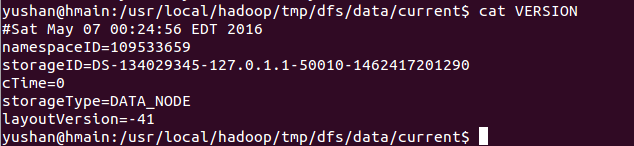
Version file:


dfs.replication is configured how many replication to have


Wednesday, May 4, 2016

HDFS shell commands

Hadoop 2.x

bin/hdfs dfs -ls /
bin/hdfs dfs -lsr /
bin/hdfs dfs -mkdir /data01

bin/hdfs dfs -put abc.txt /dir1
This -put operation will not handle file duplication, so duplicated file cannot do overwrite.
If "/dir1" not exist, the "dir1" will be a file name, not directory

bin/hdfs dfs -get /dir1/abc.txt ~/

bin/hdfs dfs -text /dir1/abc.txt

bin/hdfs dfs -rm /dir1/abx.txt
bin/hdfs dfs -rmr /dir1
bin/hdfs dfs -cp /dir1/abx.txt /dir2/abc.txt

bin/hdfs dfs -help


hadoop default user directory: /user/username, for example /user/yushan

check safe mode
bin/hdfs dfsadmin -safemode get


[yushan@hadoop-yarn hadoop-2.6.4]$ bin/hdfs getconf
hdfs getconf is utility for getting configuration information from the config file.

hadoop getconf
[-namenodes] gets list of namenodes in the cluster.
[-secondaryNameNodes] gets list of secondary namenodes in the cluster.
[-backupNodes] gets list of backup nodes in the cluster.
[-includeFile] gets the include file path that defines the datanodes that can join the cluster.
[-excludeFile] gets the exclude file path that defines the datanodes that need to decommissioned.
[-nnRpcAddresses] gets the namenode rpc addresses
[-confKey [key]] gets a specific key from the configuration

0.0.0.0 means localhost
bin/hdfs getconf -namenodes
bin/hdfs getconf -confKey hadoop.tmp.dir


Hadoop 1.x

Commands

hadoop fs -ls /
hadoop fs -lsr /


hadoop fs -mkdir /dir1

hadoop fs -put abc.txt /dir1
This -put operation will not handle file duplication, so duplicated file cannot do overwrite.
If "/dir1" not exist, the "dir1" will be a file name, not directory

hadoop fs -get /dir1/abc.txt ~/

hadoop fs -text /dir1/abc.txt

hadoop fs -rm /dir1/abx.txt
hadoop fs -rmr /dir1
hadoop fs -cp /dir1/abx.txt /dir2/abc.txt

hadoop fs -help


hadoop default user directory: /user/username
So if cannot access the default directory, we need to manually create the directory.